News & guides
Team tournaments are the best way to play competitive 40K, and the hardest to organise. 40K Team Forge is where a team gets ready for one: build a legal comp, run the club's calendar, fill in the matchup matrix together, plan the pairing, pair live by the book, and run the clock on the day. If you are new to teams events, start at the top. If you have captained for years, skip to the matrix and pairing.
Start here
A teams event is 3 to 8 players a side. Every round the two teams pair their players off, everyone plays one game, and the team's total decides the round. Three things make it different from a singles GT, and the suite is built around all three.
- The composition Each player brings a unique faction, up to 3 detachment points, and commits one Force Disposition. The team as a whole has to hit the spread for its size (1-1-1-1-1 for 5s, 2-2-2-1-1 for 8s), with at most one Space Marine faction and no clashing UNIQUE tags. The Builder checks all of it live and only calls the comp legal when it is.
- The logistics Who is coming, which event, which comp, when are lists due. The team hub holds the events, the RSVPs, the reminder emails and the comp pinned to each event, with a live card in your Discord.
- The pairing Before the round you estimate every matchup in a matrix. During the pairing you name a defender, offer two attackers, accept one of theirs, and so on through the Teams Event Companion procedure. The matrix and pairing tool do the sums while your captain does the talking.
The suite
Team comp builder
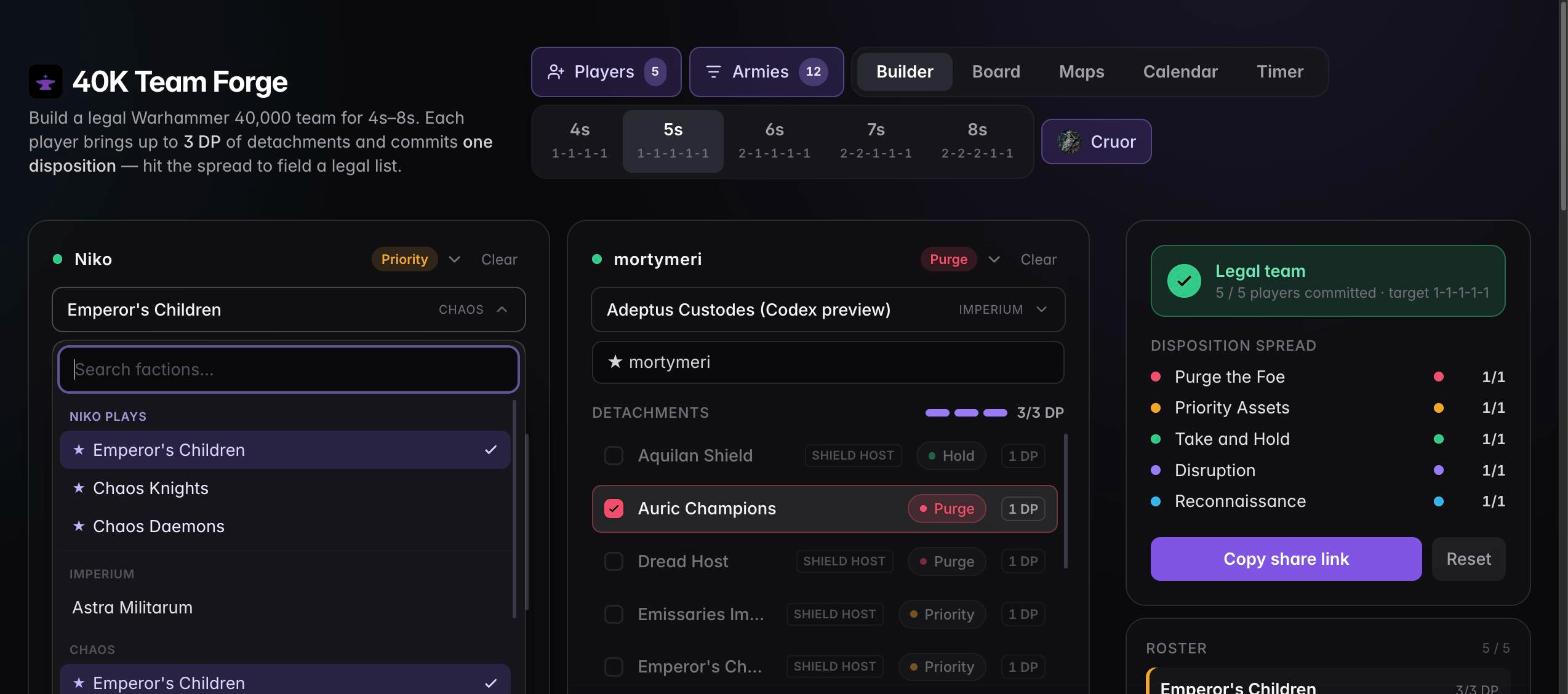
Seat your players, pick factions and detachments, commit dispositions. Live rules checking for 4s–8s: the 3 DP cap, the disposition spread, UNIQUE tags, one Space Marine faction. Import your club roster and the picker already knows who plays what. Share a link or export a PNG.
Open the Builder →Board and maps
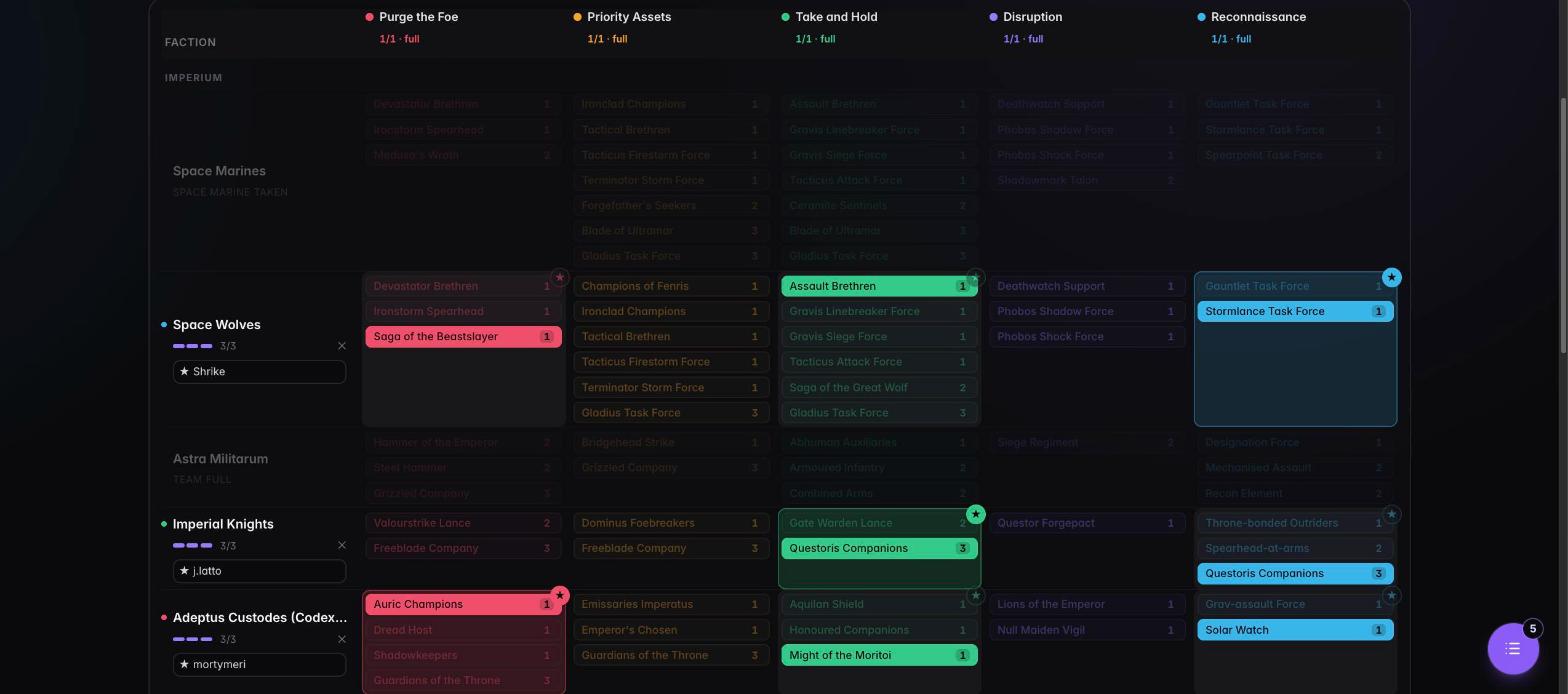
The Board is every faction × disposition on one screen, with your picks lit and the rest dimmed, for whole-team planning. Maps shows the three deployment layouts for any disposition pairing, straight from the Event Companion.
Open the Board → · Maps →Discord timestamps for online games
Offer up to three game times as <t:epoch> Discord timestamps that every reader
sees in their own time zone, with every timestamp style for a single moment. Signed in, assign the
offers to a paired game so the matrix shows them and the captain can confirm the one the opponent picks.
Team hub & calendar
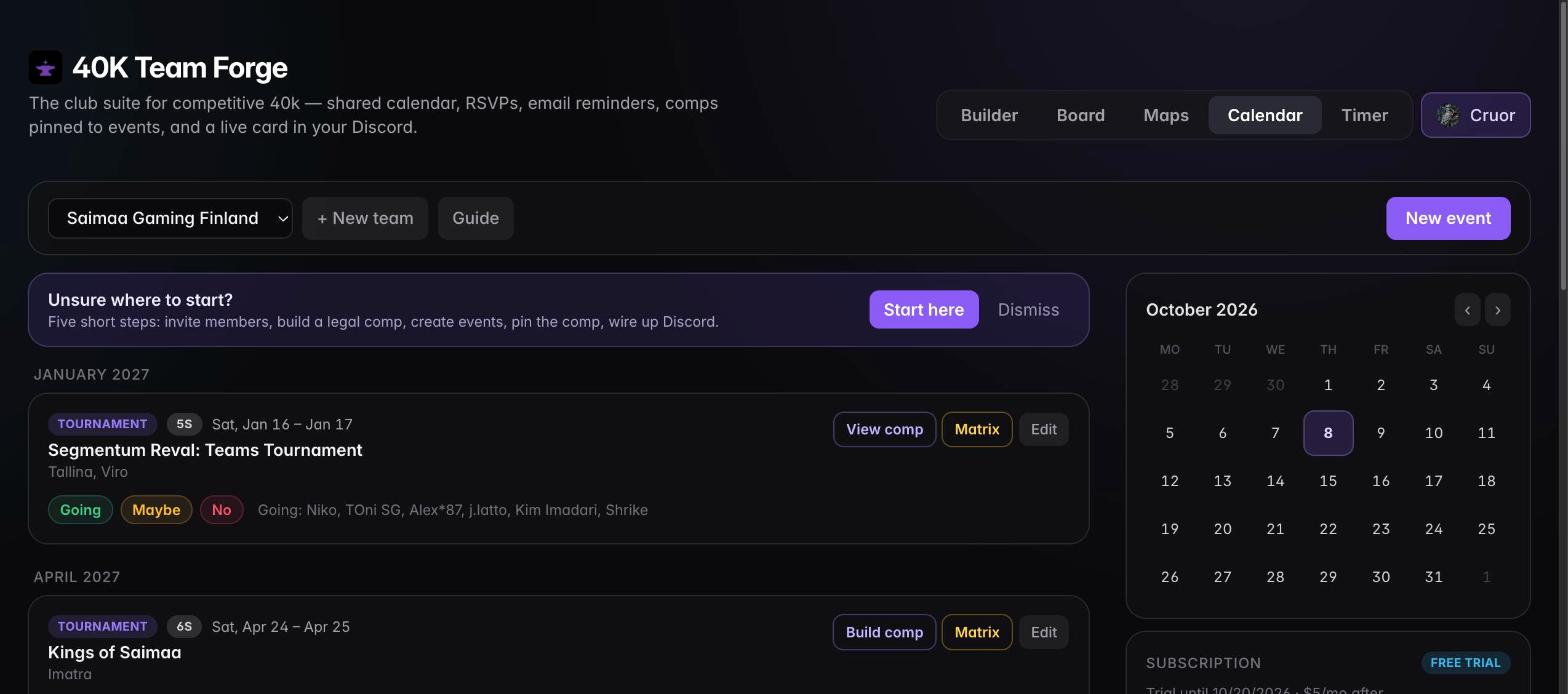
Tournaments and practice nights with a format (singles, 3s–8s), going / maybe / no RSVPs, reminder emails 7 days and 24 hours out plus templated ones you add (lists due, entry fee, travel, custom), and the comp pinned to the event. One card in your Discord channel keeps itself up to date. Owners appoint captains who can run events and comps too.
Open the Team hub →Matchup matrix
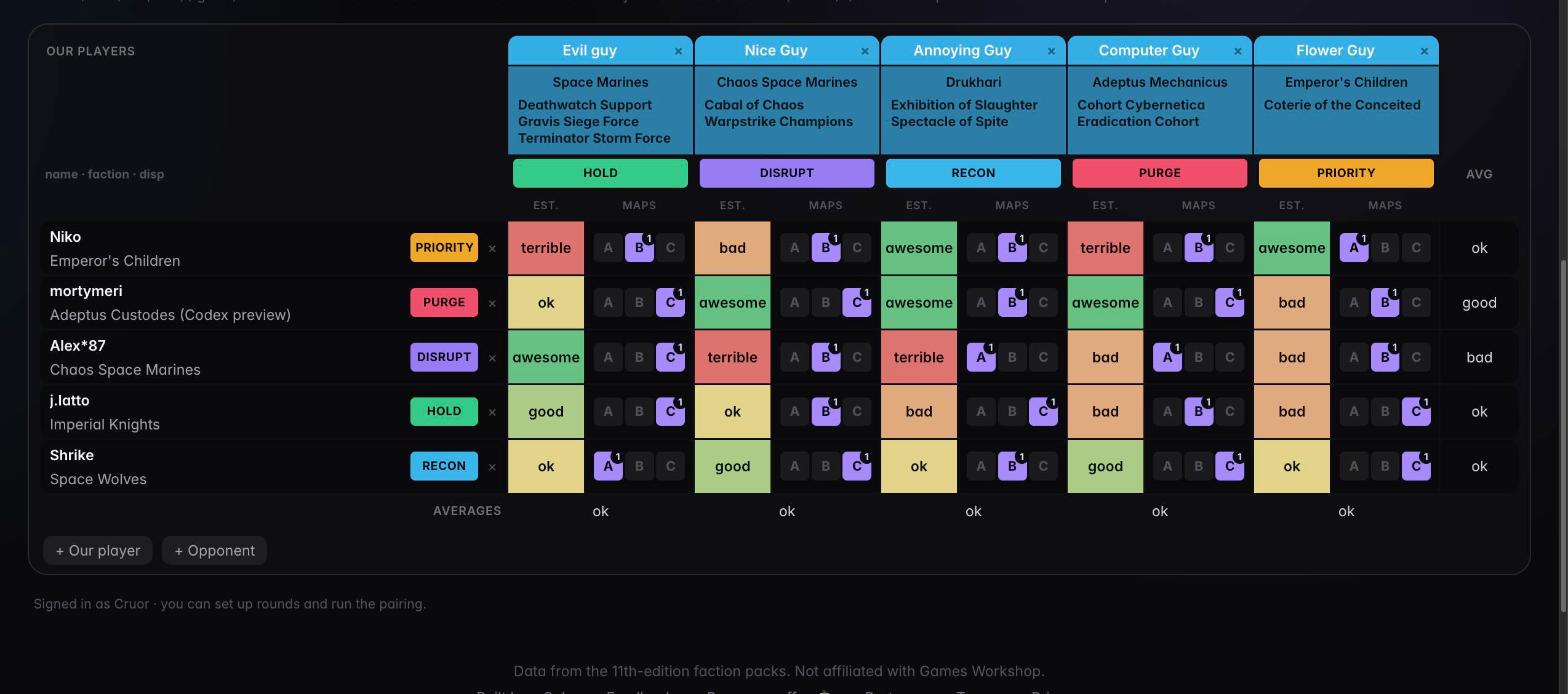
One matrix per opponent per round. Your players down the side, theirs across the top with faction, detachments and disposition colour. Every cell is your estimate, as 0–20 points, 1–5, or words, colour-graded red to green, with a ranked A/B/C table pick beside it, bad tables struck in red, a ~ for the coin-flip matchups, and notes behind it. Members fill it in. It updates live, exports as one image, and takes the real scores afterwards.
Open from an event → · How the matrix works ↓Pairing planner and live pairing
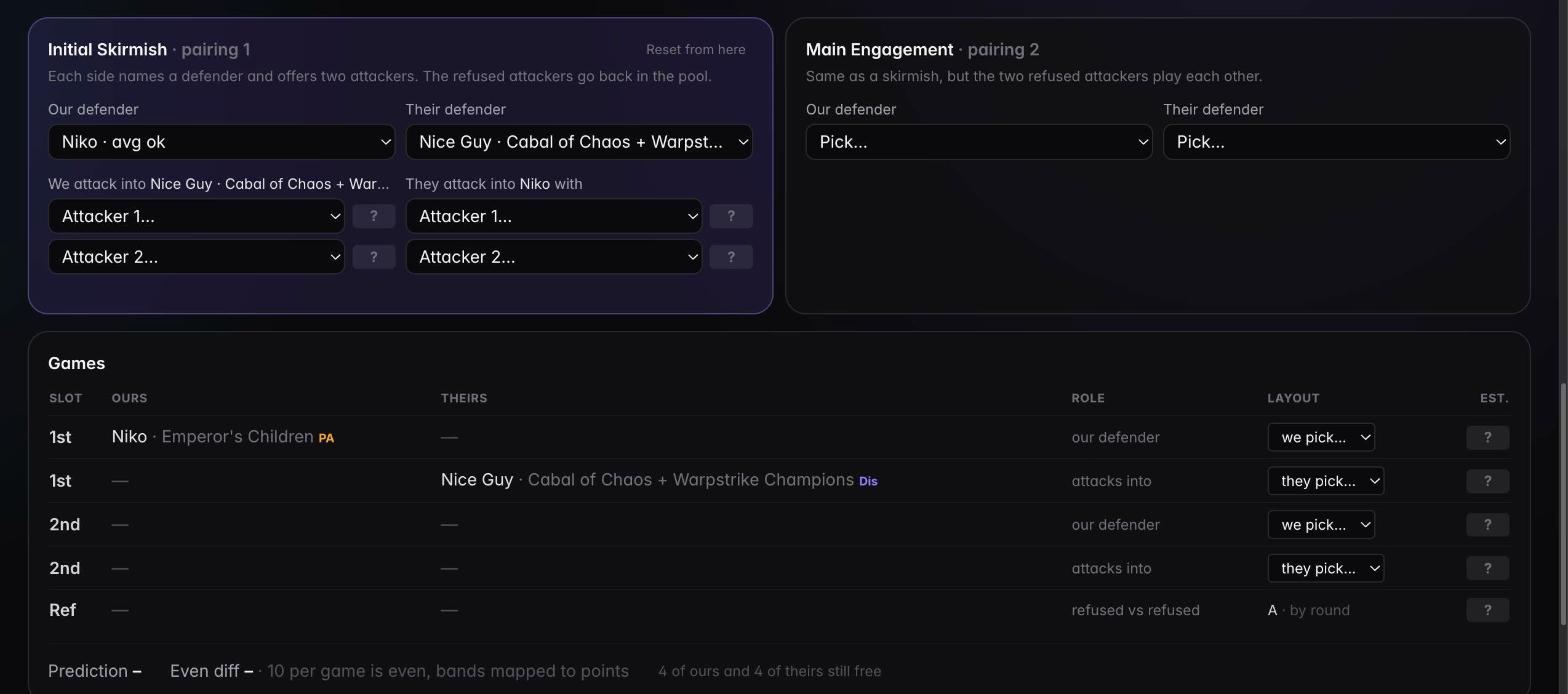
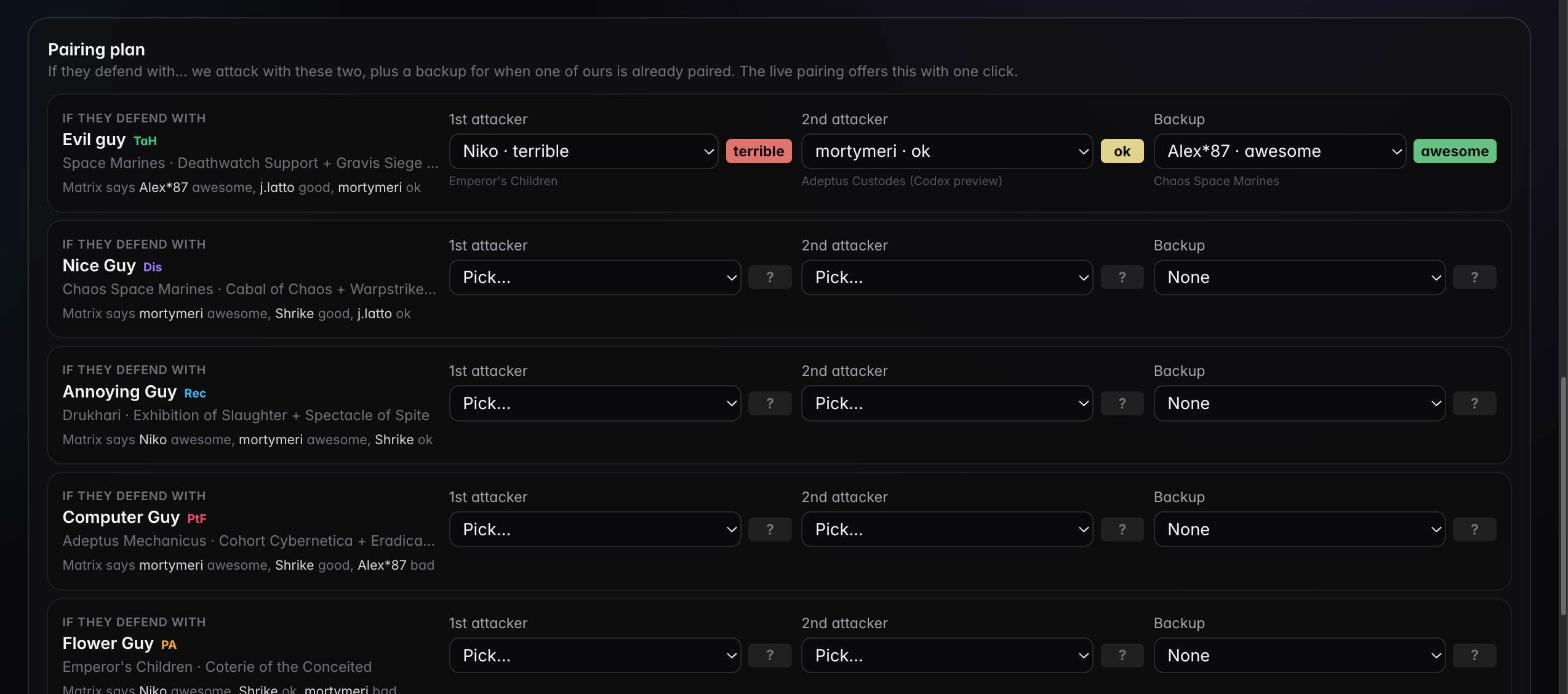
Plan first: "if they defend with this player, we offer these two, plus a backup." Then pair by the book: Initial Skirmish, Main Engagement, Champion, with the matrix estimate beside every candidate, the refused attackers handled correctly, layouts by round, and a running prediction against an even result. Hover any name for the full army and any layout for its deployment map.
How pairing works ↓Round timer
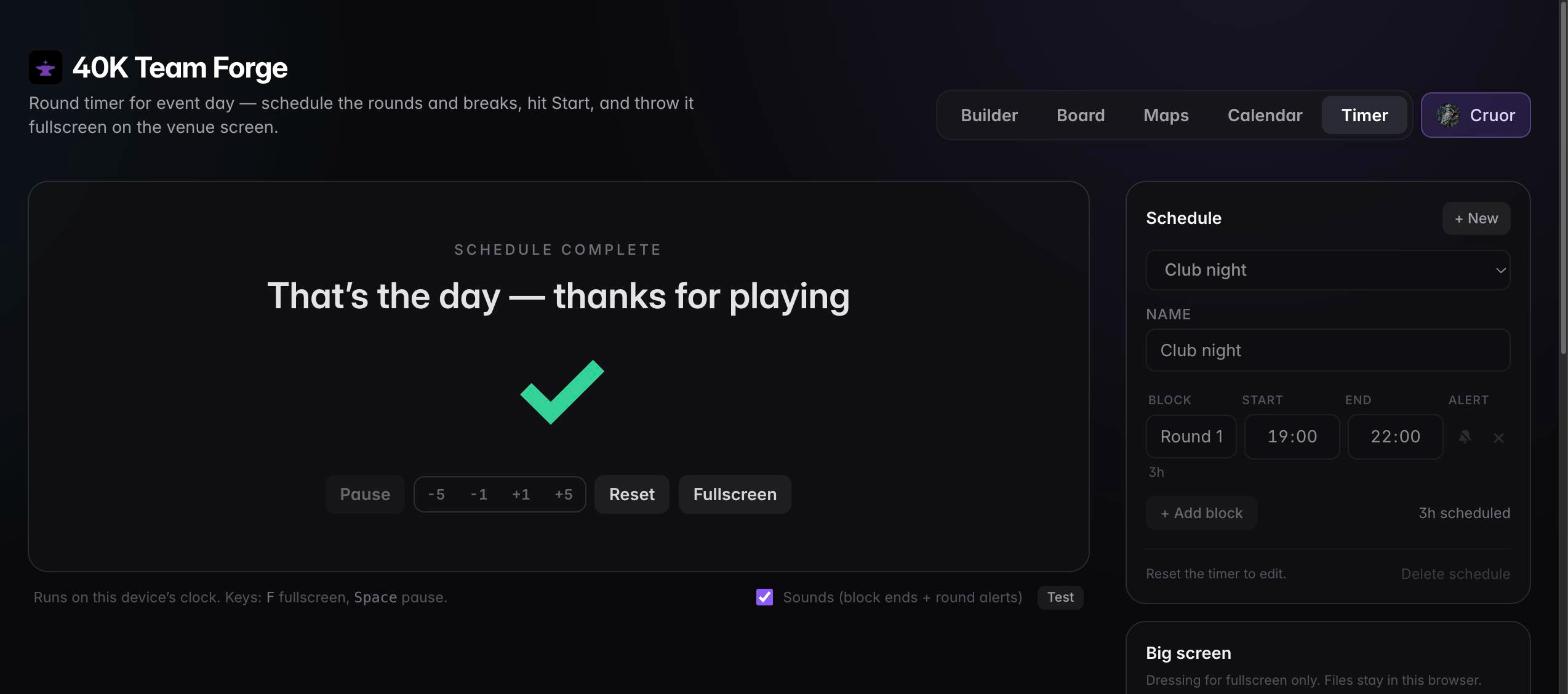
Schedule the day as clock times, hit Start, fullscreen it on the venue screen. Pause, nudge, skip, escalating alerts at halfway, 30 and 15 minutes, a background image or video, and a sponsor slideshow between rounds.
Open the Timer →Guides
What makes a team comp legal
- One faction per player, and at most one Space Marine faction across the team (Grey Knights are exempt).
- Up to 3 detachment points per player. Most detachments are 1 DP; some are 2 or 3.
- One Force Disposition each, unlocked by the detachments you took. A 3 DP detachment can unlock two, and you choose.
- The spread: at most ceil(size ÷ 5) players on any disposition, and all five present from 5s up. 4s is 1-1-1-1, 6s is 2-1-1-1-1, 8s is 2-2-2-1-1.
- UNIQUE tags: a player may field only one detachment with a given tag.
The Builder enforces every line of this and auto-commits a disposition when the rest of the team leaves a player only one open choice.
How team pairing works (Teams Event Companion)
Team sizes use these modules in order: 3s one Main Engagement; 4s Main Engagement + Champion; 5s Initial Skirmish + Main Engagement; 6s adds Champion; 7s two Skirmishes + Main Engagement; 8s two Skirmishes + Main Engagement + Champion.
- Each team secretly picks a defender; both are revealed.
- Each team secretly picks two attackers against the other defender; both pairs are revealed.
- Each team secretly chooses which of the two attackers its defender will face; the choices are revealed. That decides two games, and the defenders declare their layouts.
- In an Initial Skirmish the refused attackers go back into the pool. In the Main Engagement the two refused attackers play each other, on layout A in round 1, B in round 2, C in round 3, repeating.
- The Champion module pairs the last player on each side, on the same layout-by-round rule.
The pairing tool asks for exactly these inputs, shows the matrix estimate next to every candidate, offers your planned attackers with one click, and keeps the games table, layouts and prediction up to date for the whole team.
Scheduling online games with Discord timestamps
Online leagues and team events on Tabletop Simulator span every time zone, so the convention is: once paired, send your opponent three times you can play as Discord timestamps and let them pick. A timestamp like <t:1792083600:F> is Unix epoch seconds plus a style letter, and Discord renders it in each reader's own zone, so nobody converts anything.
- Open Times (or the standalone generator) and pick up to three slots in your own zone. Spread them over different evenings.
- Copy the message. It numbers the options and adds a relative "in 2 days" stamp next to each.
- Signed in, Assign to a paired game: choose the team, the round's matrix and your game. Members can file offers for their own game, captains for any.
- In the matrix's results table the offers sit under the game's time. When the opponent answers, click the one they picked and it becomes the game time; "Copy Discord msg" resends the offer and "Offer times" jumps back to the generator with that game preselected.
Assistants connected over MCP get the same through offer_game_times, and get_matrix lists the offered times per game.
How the matrix works, start to finish
The matrix is the team's shared read of one round: every one of our players against every one of theirs, with a number in each cell. It is where the pre-round homework lives, what the captain reads during the pairing, and what you score against afterwards. Everyone on the team sees the same matrix and every change lands on everyone's screen as it is made.
Setting up a round
- One matrix per opponent per round. Press Matrix on the event and add a round. If a comp is pinned to the event, your players come in with their faction, detachments and disposition already filled; otherwise you get empty rows for the event's format.
- Opponents across the top. Add each of theirs with the same faction and detachment picker as the Builder, so their disposition colour and detachment list are right. A row or column removed by mistake comes back with Undo.
- Players without a name show as their army, or their faction, so a matrix filled in a hurry still reads.
- Pick an estimate style for the round: 0–20 dropdown (0 · 5 · 8 · 9 · 10 · 11 · 12 · 15 · 20, each with its own colour), 0–20 typed, 1–5, or words from terrible to awesome. 10, 3 and "ok" are even. The 1–5 and word scales map onto point bands, so totals and predictions work in every style.
- The matrix is linked to the event, so a refresh or a shared link lands on the same round.
Filling it in
- Every member fills in their own row. The cell is the board points we expect from that game, colour-graded red through amber to green. Row and column averages sit at the edges, so you can see at a glance who is the problem on either side.
- Tables. Tap A, B or C beside a cell in the order you want them; the first pick is highlighted. Tap a chosen table again and it turns red and struck: a bad table for this matchup. Most matchups don't care about the table, so the ones that do stand out.
- Volatile. The fourth chip, ~, marks a swingy matchup: the number is a coin flip around the estimate, not a steady expectation. It shows as a dashed outline in the grid and follows the estimate into the pairing.
- Notes behind each cell hold the plan for that game: what to screen, what to trade, what the opponent's list actually does.
- Hover an A/B/C chip on desktop and the deployment map for those two dispositions pops up, with both primary missions.
- On a phone, a "N more →" nudge shows when opponents are off to the side.
Plan and pairing
- Plan is the captain's homework: for each possible defender of theirs, our two attackers and a backup, with the estimate beside each so the trade-offs are visible.
- Pairing walks the Teams Event Companion live: defender, two attackers, accept, through every module for 3s–8s. Each candidate shows its estimate, the volatile marker, and our table preference with any bad tables in red. Hover a defender, attacker or pick for the full army: faction, disposition and each detachment. Hover the layout pick for the map, or all three if nothing is declared yet.
- The games table keeps the layouts (declared, or by round for refused attackers and the champion) and a running prediction against an even result.
After the round
- Results & schedule. Enter each game's WTC board points and see the miss against the matrix estimate, game by game and for the round. For online leagues, each player sets when their own game is played; times are stored in UTC and shown to everyone in their own time zone, with "next game" at the bottom.
- Share image renders the whole matrix as one PNG, in the round's colours, with table preferences, averages and the games actually played outlined, for the end-of-scrim exchange with the other team. Copy summary gives the results as text for Discord.
Who can do what: owners and captains create rounds, add and remove players, write the plan, run the pairing and report results. Every member fills in estimates, tables, volatile marks and notes, edits their own row, and sets their own game time.
What's new
-
Projected final score
The results footer now shows where the round lands if the rest goes as the matrix says: the scores entered so far plus the estimate for every game still to play, as our points against theirs. Games with no estimate are counted out and said so. It is in the copied summary and in
get_matrixasprojected_final. -
Assistant estimates stay grey until you confirm them
An estimate written over the API or MCP (
set_estimate) is now a suggestion: the grid, the pairing screen, the plan and the shared PNG show it in grey italics rather than its colour, so a matrix your assistant filled in is never mistaken for one the team has weighed. Hover shows why. A ✓ in the cell confirms it, or one button under the grid confirms every assistant estimate at once; typing or picking the value yourself confirms it too. Confirmed cells colour as before. The JSON export andget_matrixreportconfirmedper cell. -
Reminder templates, and reminders only for people who answered
An event used to allow one extra reminder at a time of your choosing. It now takes as many as you like, each from a template: Lists due, Entry fee, Travel & stay or Custom, with a suggested time (three, fourteen and thirty days out) you can move, and a note for the details: where to send lists, how much and to whom, who books the hotel. The email leads with the template wording and your note underneath; a custom reminder is just your note. Moving a reminder that already went out sends it again at the new time. Reminders of every kind, the automatic 7-day and 24-hour ones included, now go only to the event's creator and to members who answered going or maybe. Nobody who hasn't answered, or answered no, gets one.
-
The whole matrix on one screen, and a JSON export
The maps column is gone: each estimate now carries a thin strip underneath showing its table talk (ranked layouts, struck bad tables, ~ for volatile), and tapping the strip opens the old chip row in a popover. With the columns that much narrower an eight-a-side matrix fits the page width without scrolling. The shared PNG lines every number up on the same baseline whether or not a cell has map talk under it, and a new JSON button next to it copies the full matrix to your clipboard for your own records (a download where the clipboard is unavailable): both rosters with detachments, every estimate with maps, volatility reasons and notes, the averages, and the pairing with times and scores, in the same shape the
get_matrixtool returns. Row and column averages also got a scale of their own, separate from the estimate colours: the best in the set is solid cyan, the worst solid rose, and the rest tint between, in the grid and on the PNG. -
Say why a matchup is volatile
Ticking the ~ chip on a matchup now asks why it swings and what tips it: first turn, a key roll, whether they castle. The note shows on hover wherever the ~ appears, including every estimate on the pairing screen, so the captain weighing a coin-flip game sees the reasoning without opening the grid. The same box clears the flag. The
set_estimatetool takes avolatile_notetoo. -
Players report their own scores
The results table no longer waits for a captain: once the pairing has decided your game you can enter your own board points, the same way you set your own game time. Rows the captain typed by name rather than picked from the roster are open to every member. Captains still report any game. The event form also splits date and time into two fields and says what is missing when "Create event" is greyed out.
-
Dataslate: MFM v1.6 and Codex Adeptus Custodes
Every detachment list was re-verified against Munitorum Field Manual v1.6. The only change is Adeptus Custodes, which now carries the Codex set: thirteen detachments, SHIELD HOST unique on six of them, and Guardians of the Throne at 3 DP unlocking Priority Assets or Purge the Foe. The list is identical to the preview faction we shipped earlier, so that entry is gone and any comp or share link that used it opens as plain Adeptus Custodes with its detachments intact.
-
Discord timestamps for online games
A new free Times page builds the courtesy message online leagues trade: up to three proposed times as
<t:epoch>Discord timestamps, which every reader sees in their own zone, plus every timestamp style for a single moment. Signed in, "Assign to a paired game" files the offers on a game in one of your matrices; the results table lists them with a one-click confirm once the opponent picks, and "Offer times" links back from any game. Assistants get the same throughoffer_game_times. -
House rules: several Space Marine chapters
Some casual leagues let a team field more than one Adeptus Astartes army, each supplement counting as its own faction. A new "House rules" switch in the Builder and Board header turns that on for a comp: the chapters unlock in the picker and on the board, and the comp is marked "Legal under house rules" with a warning. It travels with the share link and is not Event Companion legal, so leave it off for tournaments that follow the companion.
-
Flip mission cards in place
On the Maps page, missions with an Objective Action side open as a two-sided card. Hit Flip (or F, Space or an arrow key) to turn it over without closing.
-
Bring your own assistant: API & MCP access
A $5 per month add-on for any member who wants it. Subscribe from the "API & MCP access" card on the Team hub, point Claude, Cursor or any MCP client at
https://40kteamforge.com/api/mcpand sign in once. It can then read your teams, events, comps and matrices, RSVP, create and edit events, fill in estimates and table picks, set up the next round's matrix from the pairings and report results. It acts as you, with your roles, and only ever inside the teams you are a member of. -
Hover for armies and maps
In pairing mode, hovering any defender, attacker or pick shows the full army: faction, disposition and each detachment. On touch screens the detachments sit under the name instead. Hovering a layout chip in the matrix, or the layout pick in the pairing table, pops up the deployment map for that matchup with both primary missions. Unnamed players now show as their army or faction.
-
Table talk, volatile matchups, game times and results
In the matrix, tapping A/B/C now cycles preferred → bad table → clear, so the matchups where the table matters stand out in red; a fourth ~ chip marks a volatile (swingy) matchup, striped in the grid and flagged in the pairing. After the pairing, the Results & schedule panel takes each game's WTC score against the matrix estimate, and when each game is played: stored in UTC, shown in your own time zone, members set their own game. Members can also fill in their own detachments on a pinned comp from the team hub, and the Builder never moves a committed disposition for you any more: clashes stay visible and you fix them by hand or with the one-click swap.
-
Share the matrix as an image, swap dispositions, pick opponents faster
Share on a matrix copies it as a PNG for the end-of-scrim exchange with the other team: both armies, every estimate in the matrix's colours, map preferences, averages, and the games actually played outlined. In the Builder a disposition held by a committed teammate shows ⇄ when their detachments unlock yours, and one click trades the two. Opponents in the matrix use the same faction and detachment picker as the Builder, and on a narrow screen an "N more →" nudge shows when opponents are off to the side.
-
Team hub, profiles and a wider faction picker
The Calendar is now the Team hub. Your profile gains an editable alias and Discord handle, events get Copy roster list, and owners and captains can fix a teammate's name, handle and declared armies. The faction picker can reveal armies outside the team's pool on demand, and muted text across the site was lifted to AA contrast.
-
Dataslate: MFM v1.5, Codex Space Marines and a Custodes preview
Every faction's detachment list was regenerated from the Munitorum Field Manual v1.5: Space Marines and every divergent chapter now carry the Codex Space Marines set at chapter-specific availability, with the 3 DP detachments unlocking two dispositions, and the errata dropped twelve UNIQUE tags across Aeldari, Drukhari and Genestealer Cults. Two preview factions let you plan for events releasing with the book: Space Marines (Codex preview) from the Tabletop Battles articles and Adeptus Custodes (Codex preview) from the leaked detachment list, each mutually exclusive with its current-book faction.
-
Matchup matrix, pairing planner and live pairing
One matrix per opponent per round, three estimate styles, ranked A/B/C map picks, a plan per possible defender, and a pairing tool that walks the Teams Event Companion for 3s–8s with layouts by round. Live for the whole team. Estimates are dropdowns with the sheet's stepped colour palette. Events gain a 3s format, owners can appoint captains, "Build comp" starts a comp from the event's roster and format, and this News & guides page went up.
-
Partner clubs and a Start-here guide
Saimaa Gaming is the first partner club. A five-step guide in the team hub covers invites, building a comp from the roster, events, pinning and the Discord card. Team owners can rename their team.
-
Round timer for event day
Schedule the rounds as clock times and fullscreen the countdown on the venue screen, with escalating alerts, a background image or video, branding, and a sponsor slideshow.
-
Club roster in the Builder
Members declare the armies they play. Import the club roster and the picker shows who brings what; seating a player auto-picks their first legal army. The Discord card links the comp pinned to each event.
-
Club calendar
Teams, invite links, events with RSVPs, reminder emails, comps pinned to events and a live Discord channel card. $5 per team per month, 14-day free trial, members join free.
-
Deployment maps
Browse the three layouts for any disposition pairing, straight from the Event Companion.
-
Team comp builder and Board
The free legal-comp builder for 4s–8s with live rules checking, the faction × disposition Board, shareable links and PNG export.
FAQ
Is it free?
The Builder, Board and Maps are free with no account. The club suite (calendar, RSVPs, reminders, Discord card, matrix, pairing, timer) is $5 per team per month with a 14-day free trial, paid by the team owner. Members join free via invite links. API & MCP access, for connecting your own assistant, is a separate $5 per month per user who wants it.
Which team sizes are supported?
Comps for 4s–8s in the Builder. Events can be singles or 3s–8s, and the matrix and pairing tool handle 3s–8s with the right pairing modules for each size.
Does the pairing follow the official rules?
Yes. The modules, the defender / two attackers / accept-one steps, the refused-attacker handling and the layout-by-round rule follow the Warhammer 40,000 Teams Event Companion. Legality follows the Munitorum Field Manual detachment and disposition data, verified against each release.
Who sees the matrix?
Everyone on your team, live. Members fill in estimates and map picks; the owner and captains set up rounds and opponents and run the pairing.
How do I offer game times on Discord?
Use the free Discord timestamp generator: pick up to three times, copy the message, and every reader sees the slots in their own time zone. In the app the Times page can also assign the offers to your paired game.
Do I need Discord?
No. Sign in with Discord or a magic-link email. The Discord channel card is optional and needs only a webhook from your own server.
Ready for your next teams event?
Build a comp right now with no account, or create your team and start the 14-day trial to get the calendar, matrix, pairing and timer for the whole club.